Quick Qverview – header and cms interface

Description

A quick overview of the CMS menu in the top bar when you are logged in and the CMS interface.

There are three main categories.
1. pages (Post and Pages)
2. media (images, graphics etc.)
3. forms

  • Pages can appear under post and pages. In addition, we have subcategories, such as "Products in Stock", in which certain pages are sorted. This helps with the structure and integration into the page.
  • WordPress collects all images (photos, graphics, videos, etc.) under Media. It is a folder into which all images are loaded. WordPress sorts here only by date.
  • There is an additional plugin (happy files) here that allows us to put the content into its own folder structure (These are the folders in the middle column with the heading "Categories"). So we can sort and structure the content. The plugin also works for all menu items where pages are. Learn more about it
Instruction

Menu bar in frontend

When you are logged in to the cms, there is a bar at the top with various menu items or options.

  1. under W you find general links to wordpress.
  2. under Bartels Doors you get to the main menu of the CMS.
  3. bubble is for comments, which we don't use.
  4. under new you see several options to create new pages or content.
  5. via Edit Page you get to the current page and can edit it. This is the most important point.
  6. (y) yoast is our SEO tool
  7. duplicate post creates a copy of the page. This can help when creating new pages.

CMS interface

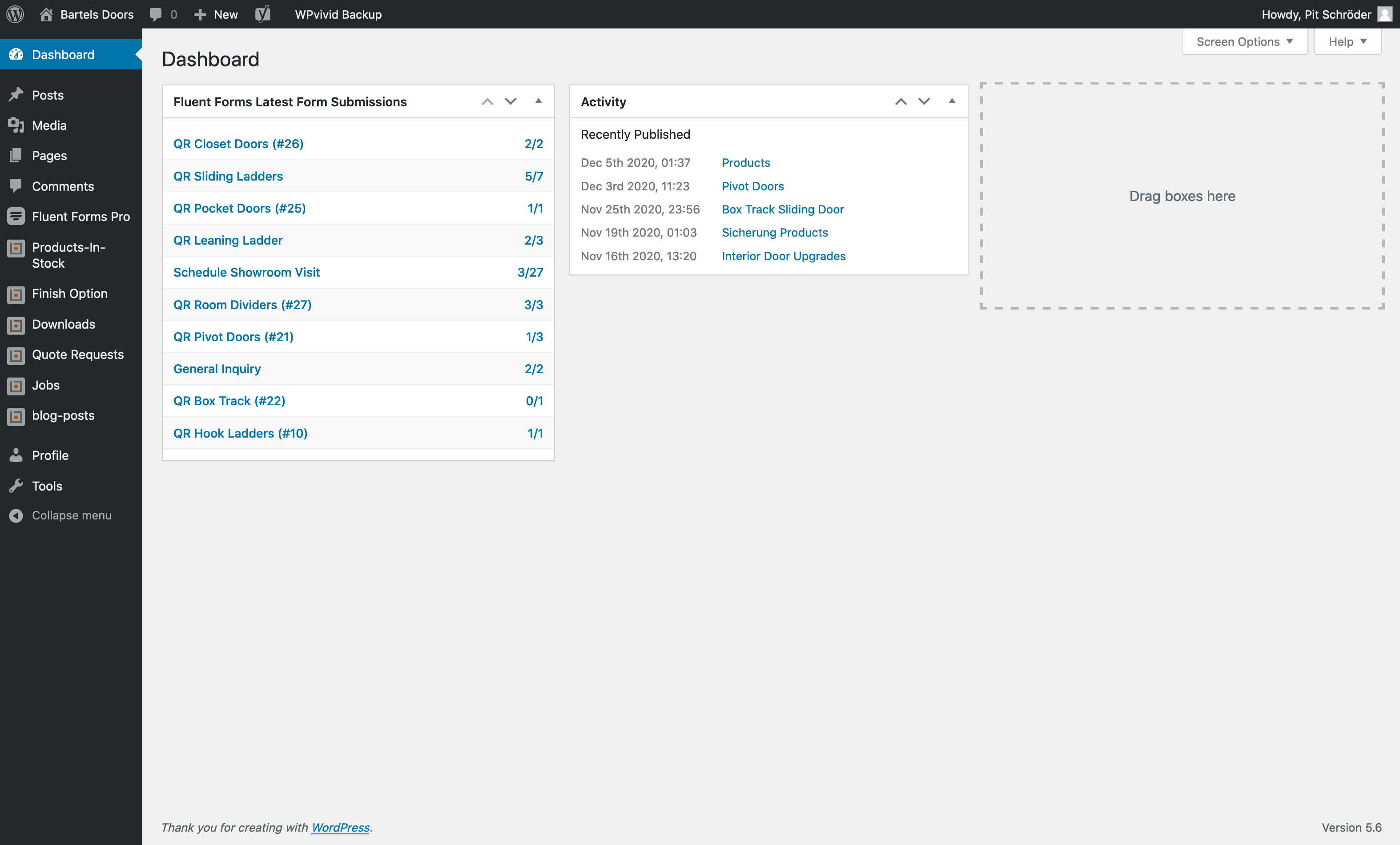
Picture shows the CMS Dashboard

  • The dashboard is not very interesting. But it shows among others form entries. You can also find them under Fluent Forms Pro > Entries.
  • Under Fluent Forms you can find all forms. Here they are created, managed and the entries are collected.
  • Most of the menu items sort different page types. For example, product pages, form pages or other content pages. It is easier to manage and include them this way.
  • Under "Post" are most of the product pages.
  • Under "Media" you can find all media, like pictures, graphics and so on.
  • Under "Pages" you will find more pages. They are often the entry pages or overview pages, from which we go to product pages, for example.
  • Under" Products in stock" you can find all in stock product pages.
  • Under "Finish options" all finishes are summarized.
  • The same is true for "downloads". Here you can find all catalogs and specs.
  • Under "Quote Requests" we find the pages where the forms are included. The forms themselves are created under Fluent Forms Pro.
  • Under "Jobs" are your job postings.
  • And "Blog-posts" are the posts for the blog. Currently there is no page here yet.
Go to this page (bartelsdoors.com)
You must be logged in to the CMS to edit this page.
Questions, comments, extensions
Email
Copyright © 2026 All Rights Reserved
Top crossmenuchevron-downarrow-left